2027 Goal Planner: A Practical Tool for Intentional Planning
Planning for a year that feels distant can be a challenge, but the 2027 Goal Planner offers a structured yet flexible solution for those who prefer to work ahead with purpose. This planner interior, designed for both print and digital customization, provides a comprehensive system for setting, tracking, and reviewing goals across all areas of life. Whether you are a freelancer mapping out long-term projects, a small business owner organizing quarterly targets, or an individual focused on personal development, this planner adapts to your needs without forcing a rigid template. Its greatest appeal lies in the balance between structure and creative freedom, making it a resource worth examining for anyone who values intentional planning.
What Makes the 2027 Goal Planner Stand Out
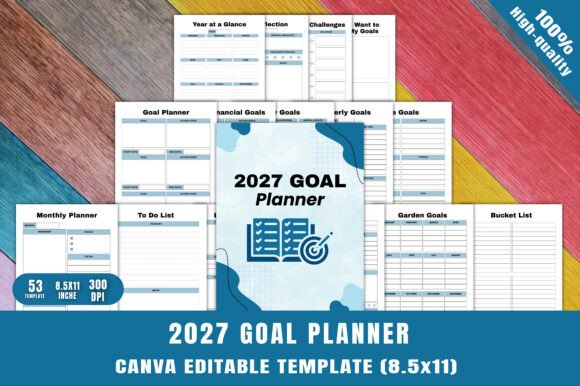
The 2027 Goal Planner distinguishes itself through its dual format: a print-ready PDF and a fully editable Canva template. Seventy-four unique pages cover everything from annual calendars to daily goal trackers, vision boards, and financial overviews. The inclusion of specialized sections like the 90-day goals planner, SMART goal worksheets, and obstacle identification sheets reflects a thoughtful approach to goal setting that goes beyond simple to-do lists. The planner doesn't just ask what you want to achieve—it prompts you to examine barriers, break down large ambitions into manageable steps, and review progress systematically. This layered structure is particularly useful for professionals and entrepreneurs who need to align daily actions with larger strategic objectives.
Another distinguishing feature is the variety of niche pages: garden goals, bucket lists, fitness overviews, and even a 30-day challenge tracker. This diversity means the planner can serve multiple roles within a single document, reducing the need for separate notebooks or digital tools. The flexibility to remove, rearrange, or redesign pages in Canva ensures that users can tailor the planner to their exact workflow, whether that means adding extra budget trackers or omitting sections they don't need.
Usability and Flexibility for Different Workflows
Usability is where the 2027 Goal Planner truly shines for its target audience. The print-ready PDF offers immediate utility: download, print, and begin writing. For digital-first users, the high-resolution JPG and PNG files allow integration with note-taking apps like GoodNotes, Notability, or OneNote. The Canva template, provided as the source file, is particularly valuable for creators who publish planners on KDP or Etsy, as it enables full customization of colors, fonts, and layouts without requiring graphic design skills. This flexibility means a publisher can rebrand the planner for a specific niche—such as minimalists, wellness coaches, or corporate teams—without starting from scratch.
Real-world testing reveals that the monthly and weekly layouts are clear, uncluttered, and provide enough space for meaningful entries. The daily planner page includes sections for priorities, tasks, notes, and habit tracking, which helps maintain consistency. The goal review and reflection pages encourage periodic assessment, a practice often overlooked in simpler planners. For busy professionals juggling multiple projects, the quarterly and annual overviews offer a macro perspective that keeps long-term objectives visible among daily demands.
One practical recommendation: if you plan to use the planner for both personal and professional goals, consider creating two separate copies in Canva—one for work and one for life. The editable template makes duplication and re-theming straightforward, and you can save each version with distinct color schemes for quick differentiation.
Quality and Design Considerations
The design quality of the 2027 Goal Planner is clean and modern, with ample white space and a layout that avoids visual clutter. The pages are intentionally simple, which is a strength for those who find overly decorative planners distracting. The typography and spacing appear to be optimized for both handwriting and digital typing, so notes remain legible even when printed at a smaller size or used on a tablet. The high-resolution files ensure crisp output whether printed at home or through a professional service, and the PNG files maintain transparency for layered digital use.
Consistency is maintained across all 74 pages, with uniform header styles, alignment, and page numbering. This coherence is important for planners that span an entire year, as it creates a seamless experience from the January monthly spread through the December review. The cover and divider pages, while not included in the page count, would pair well with the interior's aesthetic—a detail worth noting for publishers who want to maintain brand continuity.
A possible limitation is that the planner does not include pre-filled dates for 2027. Users must either enter dates manually in the Canva editor or write them in after printing. For some, this is an advantage because it allows reuse across different years or flexible starting months. For others, especially those who prefer a ready-to-use product, this may require an extra step. The trade-off is clear: customization over convenience, and the planner is transparent about this design choice from the outset.
Who Benefits Most from the 2027 Goal Planner
This planner is well-suited for several specific user groups. KDP publishers and Etsy sellers will appreciate the commercial license and the ability to modify every element to differentiate their products in a crowded marketplace. The editable Canva template reduces production time significantly, allowing sellers to focus on marketing and packaging rather than layout design. Freelancers and creative professionals who manage multiple income streams or projects will find the quarterly and annual goal pages particularly useful for tracking progress on longer timelines. Educators and coaches can adapt the planner for client use, perhaps as a workbook for goal-setting workshops or a tool for student mentoring programs.
Serious hobbyists with interests like gardening, fitness, or personal finance will appreciate the dedicated pages for these areas. The garden goals page, for example, includes space for planting schedules and harvest targets, while the financial overview pages cover yearly income, savings, and investment goals. This specialization adds depth without requiring users to purchase multiple planners. For corporate professionals, the SMART goals and obstacle identification sections provide a framework that aligns with business planning methodologies, making the planner equally viable for career development as for personal growth.
One group that may find the planner less ideal is individuals who prefer minimalist, single-purpose notebooks without section divisions. The 2027 Goal Planner is designed for comprehensive goal management, not for simple diary-style entries. If your planning style is entirely unstructured, the number of pages could feel overwhelming. However, for anyone who appreciates a guided but customizable structure, the planner offers a clear path forward.
Practical Applications and Real-World Use
Consider a freelance graphic designer who wants to grow their client base while maintaining fitness and learning a new software skill. Using the 2027 Goal Planner, they could set a SMART goal to acquire three new clients per quarter, track monthly income on the financial pages, schedule daily skill practice on the daily planner, and log workouts on the fitness overview. The vision board page allows them to visualize their ideal studio setup, while the obstacle identification page helps them anticipate scheduling conflicts or budget constraints. The quarterly review provides a natural checkpoint to adjust strategies—perhaps shifting from cold outreach to referral-based growth after seeing which approach yields better results.
For a small business owner preparing a three-year growth plan, the 2027 calendar and annual goal pages serve as a central reference point. The 90-day goals section breaks down the year into manageable sprints, making it easier to implement changes without losing sight of the bigger picture. The planner becomes a living document that evolves with the business, and the Canva editing capability means new pages or sections can be added as operations grow or pivot.
Publishers can create multiple variations of the planner for different niches by adjusting the cover and swapping out page colors. For example, a version targeting fitness enthusiasts could emphasize the fitness overview and 30-day challenge pages, while a version for financial planners could highlight the yearly financial goals and budget trackers. The modular nature of the design supports efficient product line expansion without requiring new original layouts each time.
Long-Term Value and Reusability
The undated structure of the 2027 Goal Planner extends its lifespan beyond a single year. Users can repurpose the pages for 2028 or start mid-year by simply labeling the months themselves. This is a practical advantage for those who don't operate on a January-to-December schedule, such as freelancers working on project-based timelines or educators aligned with academic calendars. The durable print-ready files can be reprinted or reused digitally season after season, making the initial purchase or download a one-time investment in a long-term planning system.
Limitations and Considerations
No resource is without trade-offs. The 2027 Goal Planner requires some initial setup time, especially if you intend to fully customize the Canva template. For users unfamiliar with Canva, there is a small learning curve, though the interface is intuitive and widely documented. The planner does not include built-in holidays or time zones, which may be a drawback for those who rely on reminders for public holidays or international deadlines. However, adding these manually in the Canva editor is straightforward and allows for personal relevance rather than generic dates.
Another consideration is that the planner pages are designed for a standard letter or A4 format. Users who prefer pocket-sized or traveler's notebook formats will need to adjust the layout in Canva or accept the size as-is. For most digital use cases, the standard size works well, but physical printing at unusual dimensions may require trimming or scaling adjustments. The print-ready PDF is optimized for standard sizes, so planning ahead for your intended output method is recommended.
Finally, the planner assumes a level of self-motivation and consistency. Goal-setting tools are only effective when paired with regular use, and the 2027 Goal Planner does not include external accountability features beyond the review pages. Users who thrive on community or coaching support may want to pair the planner with a weekly check-in group or a digital habit tracker. For the self-directed planner, however, these pages provide sufficient structure to maintain momentum without external prompts.
In evaluating whether the 2027 Goal Planner fits your needs, consider your planning style and the specific areas of your life or work you want to organize. If you value a comprehensive, customizable system that can be adapted for multiple years and various use cases, this planner offers a solid foundation. It respects the user's autonomy while providing the scaffolding necessary to turn aspirations into actionable steps, making it a practical addition to any planning toolkit.