Behavior Support Visuals: A Practical Guide to Calmer, More Structured Environments
If you have ever tried to redirect a child who is overwhelmed, distracted, or simply not responding to verbal directions, you likely know how exhausting it can be. Repeating yourself, raising your voice, or trying to reason with a frustrated learner rarely leads to lasting change. That is where structured visuals come into play, and why so many educators, therapists, and parents turn to resources like Behavior Support Visuals. This 30-page eBook offers a systematic, ready-to-use approach for creating calmer environments through clear, visual tools. But even with a solid resource in hand, it helps to understand what can go wrong and how to sidestep common pitfalls that undermine success.
What Behavior Support Visuals Really Offers
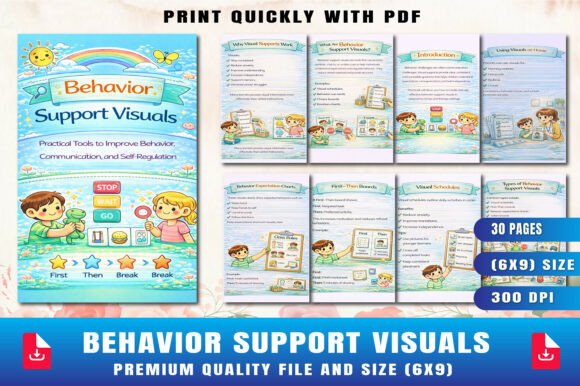
Behavior Support Visuals is not just a collection of printable charts. It is a guide that walks you through why visual supports work, which types to use in different situations, and how to implement them without adding chaos to your day. Inside, you will find sections on visual schedules, first–then boards, behavior expectation charts, token boards, emotion charts, break cards, social stories, choice boards, visual timers, and more. Each section includes clear explanations and practical tips, so you can start using the tools immediately.
The eBook is designed for teachers in general and special education settings, homeschool parents, therapists, and anyone providing support at home or in a clinic. The layout is simple: 30 pages, with both PDF and JPG files included, and a 6 × 9 inch page size that works well for printing or digital use. But having a good resource is only half the battle. The real difference comes from how you apply it.
Why Visual Supports Work
Visual supports tap into how the brain processes information. For many learners, spoken instructions can fade as quickly as they are heard. A visual, on the other hand, stays put. It provides a consistent reference that reduces anxiety, improves comprehension, and increases independence. This is especially true for individuals with autism, ADHD, anxiety, language delays, or executive functioning challenges. But visual supports also benefit typical learners who may struggle with transitions, following multi-step directions, or managing emotions.
The mistake many people make is assuming that any visual will do the job. A cluttered chart, an overly complex schedule, or a board that changes daily can actually add to confusion. That is why Behavior Support Visuals emphasizes structured, simple, and predictable tools. The book covers the types of visuals that have the strongest evidence base, and it helps you avoid the temptation to over-complicate things.
Choosing the Wrong Type of Visual for the Situation
One of the most frequent errors is using a tool that does not match the specific need. For example, a token board is excellent for reinforcing positive behavior over time, but it does not help a child who is struggling to understand what comes next in their day. That calls for a visual schedule. Conversely, a visual schedule is not designed to teach emotional regulation; that is where an emotion chart or a break card comes in.
When people grab a generic set of visuals and apply them everywhere, the result is often frustration. The child does not get the support they need, and the adult assumes the strategy does not work. Behavior Support Visuals helps you match the tool to the challenge. The eBook clearly describes each type of visual, what it is best for, and how to introduce it. Taking the time to read those descriptions can save you weeks of trial and error.
Introducing Too Many Visuals Too Quickly
Another common misstep is flooding the environment with visuals all at once. A wall full of charts, schedules, boards, and cards can feel overwhelming, especially for a learner who is already sensitive to too much stimuli. The goal is clarity, not decoration. Start with one or two tools that address the most pressing needs. For most people, a visual schedule and a simple first–then board are enough to begin.
Once the learner is comfortable with those, you can gradually add other supports, such as a token board for motivation or an emotion chart for check-ins. Behavior Support Visuals recommends this gradual approach and explains how to layer tools without overloading the learner. The chapter on "Using Visuals at Home School" includes practical advice for introducing visuals in a way that feels natural and supportive rather than intrusive.
Forgetting to Fade Supports Over Time
Visual tools are meant to build independence, not create dependency. A common oversight is leaving the same visuals in place indefinitely, even after the learner no longer needs them. This can lead to a crutch where the child relies on the chart instead of internalizing the routine or skill.
The eBook dedicates a whole section to fading supports gradually. The idea is to reduce the level of detail or frequency of use as the learner becomes more competent. For example, you might move from a full visual schedule to a simple checklist, and eventually to a verbal reminder. The key is to do this slowly and with attention to the learner's readiness. Behavior Support Visuals provides clear guidance on how to know when to fade and how to do it without causing regression.
Inconsistent Use Across Settings
Visuals work best when they are consistent. If a child sees a certain behavior chart at school but a different one at home, or if the expectations change from day to day, confusion sets in. Inconsistent use can actually increase challenging behavior because the learner does not know what is expected or what will happen next.
Teachers and parents often work in isolation, but Behavior Support Visuals encourages collaboration. Share the tools with everyone involved in the learner's day. Use the same language, the same symbols, and the same sequence when possible. The eBook includes printable resource ideas that can be used across settings, making it easier to maintain consistency. If you are a teacher, consider sending home a copy of the visuals you use at school so parents can reinforce the same expectations.
Practical Advice for Getting the Most Out of the eBook
Before you print or open the files, take a moment to identify the specific behaviors or situations you want to address. Do you need help with morning routines, transitions between activities, or emotional regulation? Make a list of the top two or three challenges. Then, turn to the corresponding section in Behavior Support Visuals and focus on those tools first. Do not try to use everything at once.
When you introduce a new visual, do it in a calm, neutral moment. Show the learner how it works, model it, and let them practice before you actually need it. For example, if you are using a first–then board, practice with preferred activities first so the learner associates the board with positive experiences. The eBook walks through this process in the "Creating Teaching Visual Supports" section, and the real-life case example at the end shows exactly how one teacher turned a chaotic classroom into a calm, productive space using this step-by-step method.
Another important detail is placement. Visuals should be at the learner's eye level and located where they will be used. A schedule posted by the door works well for transition times, while an emotion chart might be better placed near a quiet corner. Behavior Support Visuals does not go deep into environmental setup, but you can easily adapt the tools to your own space. The key is to keep them accessible and visible without creating visual clutter.
What to Check Before You Buy or Download
If you are considering Behavior Support Visuals, there are a few things to check to ensure it meets your needs. First, consider the format. The eBook comes as a PDF and includes JPG files, so you can print pages individually or use them on a tablet or computer. The 6 × 9 inch size is smaller than a standard letter-size page, which makes it convenient for handheld use or placing on a desk. If you prefer full-page prints, you can easily scale the PDF up when printing.
Second, look at the range of tools included. The eBook covers visual schedules, first–then boards, token boards, emotion charts, break cards, social stories, choice boards, visual timers, and more. If you need specialized visuals for tasks like toileting, mealtime, or community outings, you may need to supplement with additional resources. But for the core behavior support needs, this eBook is comprehensive.
Third, check the level of detail in the instructions. Some resources provide printable tools with little guidance on how to use them. Behavior Support Visuals includes explanations and implementation tips for each tool, which makes it suitable even if you are new to visual supports. The sections on common mistakes and fading supports are particularly valuable for avoiding the pitfalls that can derail progress.
Realistic Examples of Better Approaches
Consider a common situation: a child who resists transitions from play to cleanup. Without visuals, the adult might say, "Time to clean up now," only to be met with defiance or ignoring. A better approach, as outlined in Behavior Support Visuals, is to use a first–then board. Show the child "first clean up, then tablet time." The visual makes the expectation clear and shows a motivating outcome. Over time, you can fade the board by using it only for harder transitions, and eventually replace it with a verbal reminder that references the board: "Remember the board? First clean up, then tablet."
Another example: a student who struggles to express when they are feeling overwhelmed. Instead of acting out, they can be taught to use a break card. The eBook explains how to introduce the break card, practice using it during calm moments, and honor its use consistently. The result is fewer meltdowns and more self-regulation. A teacher in the real-life case example used a combination of a visual schedule and a break card to reduce disruptive behaviors by more than half in just three weeks.
Final Thoughts on Behavior Support Visuals
Structured visual tools are one of the most effective and low-cost strategies for supporting positive behavior. They reduce ambiguity, increase predictability, and empower learners to take control of their own routines. Behavior Support Visuals gives you a solid foundation with ready-to-use resources and practical guidance from start to finish. The real success, however, depends on how thoughtfully you select, introduce, and fade the supports. Avoid the common mistakes of using too many tools at once, choosing the wrong type of visual, neglecting consistency, or forgetting to fade over time. With a deliberate, learner-focused approach, you can create an environment where everyone feels calmer and more capable.