Celestial Planner: A Versatile Canva Interior for Creators and Small Business Owners
If you have spent any time browsing Amazon KDP or digital product marketplaces, you have likely noticed the growing demand for well-designed planners that balance beauty with function. The Celestial Planner is one of those rare templates that manages to feel both aspirational and grounded. Designed as a Canva interior, it offers a complete set of ready-to-upload pages that can be used as-is or customized to match your brand or personal style. Whether you are a content creator building a passive income stream, a small business owner organizing your workflow, or a publisher looking for a reliable KDP upload, this planner provides a solid foundation without sacrificing visual quality.
What Is the Celestial Planner?
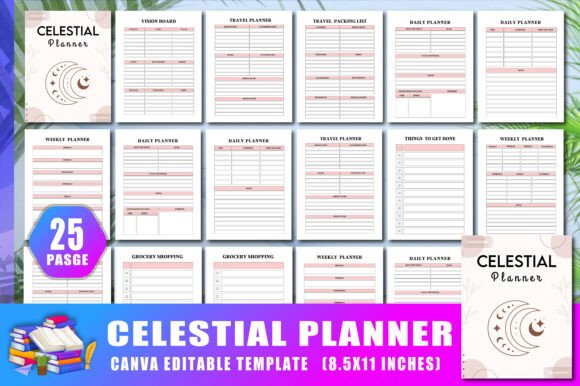
The Celestial Planner is a 25-page Canva interior template designed for print-ready use on Amazon KDP. It comes with an editable Canva link, meaning you can open it in your browser, tweak colors, adjust shapes, replace text, or remove elements entirely. The files include high-resolution JPG, PNG, and print-ready PDF formats at 300 DPI with no bleed. The practical 8.5 x 11 inch size makes it suitable for standard printing, whether you are producing a single copy or batch uploading for KDP. The planner covers a wide range of organizational needs, from daily and weekly planning to budgeting, goal setting, travel prep, and reflection prompts.
Visually, the Celestial Planner leans into a calm, celestial-inspired aesthetic. The design language is understated rather than loud, using soft color palettes, gentle geometric shapes, and subtle astronomical motifs. The typography choices tend toward clean sans serif or modern handwritten styles that feel approachable without being overly casual. This makes the planner suitable for a broad audience: professionals who want a polished tool, hobbyists who enjoy creative planning, and entrepreneurs who need a practical system for tracking goals and finances.
Who Benefits Most from This Planner?
The Celestial Planner is particularly useful for adults aged 20 to 50 who are balancing multiple responsibilities. Designers and content creators will appreciate the editable Canva link, which allows them to rebrand the pages and sell them as their own. Marketers and bloggers can use the planner to organize content calendars, campaign timelines, and budget tracking. Small business owners and entrepreneurs often need a single tool that covers daily tasks, weekly goals, monthly budgets, and annual financial targets, and this planner delivers that without requiring multiple notebooks or apps. Publishers looking for a clean, no-bleed interior for KDP will find the ready-to-upload files save hours of formatting work. Crafters and hobbyists who enjoy adding stickers, washi tape, or hand-lettering to their planners will find the layout gives them enough structure without feeling rigid.
Key Features That Set It Apart
One of the strongest aspects of the Celestial Planner is the breadth of included pages. You get a Belongs To page for personalization, a dedicated travel packing list, a travel planner, a vision board spread, and multiple budgeting sections including weekly budget, monthly budget, and financial goals for the year. The daily reflections page adds a mindfulness component that many standard planners overlook. For goal-oriented users, there are yearly goals, weekly goals, and monthly goal pages. Practical pages like Things to Get Done, grocery shopping lists, to-do lists, ideas, and notes round out the set. This means you are not forced to buy multiple planners for different aspects of your life; everything lives in one cohesive document.
From a design perspective, the planner uses a clean layout with clear section headers, ample white space, and subtle visual cues. The 300 DPI resolution ensures that printed pages remain sharp, even when you are using fine pens or markers. The no-bleed format simplifies home printing or commercial printing, and the editable Canva link gives you full control over colors, typography, and layout. If you want to match the planner to your brand colors, you can do that in minutes. If you prefer a different font pairing, you can swap the existing typeface for a serif or sans serif font that better suits your style.
How Design Affects Readability and Brand Perception
Typography and layout play a significant role in how a planner is perceived and used. The Celestial Planner uses a modern typography approach that leans toward clean, readable sans serif fonts for headings and body text. This choice supports quick scanning, which is essential when you are using a planner under time pressure. The hierarchy is clear: main sections are easy to locate, subheadings guide you to the right page, and the content areas are spacious enough to write in without feeling cramped. For a print-ready product, readability is paramount. Users should be able to glance at a page and immediately understand where to write their tasks, goals, or reflections.
From a brand identity standpoint, the celestial theme offers a distinct personality. The soft, space-inspired aesthetic evokes calm, exploration, and intentionality. This can influence how users feel about their planning process. Instead of viewing planning as a chore, the visual design makes it feel more like a creative ritual. For publishers who plan to sell this interior on KDP, the visual appeal directly affects how potential buyers perceive the product. A well-designed interior with consistent typography and a cohesive color scheme suggests professionalism and attention to detail, which can lead to better reviews and higher conversion rates.
Practical Guidance for Using the Celestial Planner
If you are purchasing the Celestial Planner for personal use, the first thing you should do is open the editable Canva link and adjust the color palette to match your preferences. The existing celestial theme uses soft blues, purples, and neutrals, but you can easily shift to warm tones, monochrome schemes, or bright accents. This step alone makes the planner feel custom-made. Next, review the included pages and decide which ones you will use regularly. You can remove pages you do not need and duplicate pages you use often, such as the daily planner or weekly budget. Because the interior is 25 pages, you have room to create a focused system without unnecessary bulk.
For content creators and publishers who plan to upload this interior to Amazon KDP, the ready-to-upload files are a significant time saver. The PDF is formatted at 8.5 x 11 inches with no bleed, which is a standard KDP requirement. You can upload it directly without additional formatting. However, you may want to customize the Belongs To page and add your branding or logo to differentiate your listing. The editable Canva link makes this straightforward. You can also modify the typography: if you prefer a more traditional serif font for the headings, or a handwritten script for the quotes and reflections, you can make those changes before generating your final PDF.
Font Pairing and Design Considerations
While the Celestial Planner comes with a pre-selected set of fonts, you have the freedom to change them. If you are aiming for a more formal or editorial feel, consider pairing a clean serif font for headings with a neutral sans serif for body text. This combination communicates professionalism and is often used in magazines and premium notebooks. For a softer, more approachable look, a rounded sans serif paired with a casual handwritten font works well. The celestial theme lends itself to modern, airy typefaces rather than heavy or ornate ones.
When testing font pairings, keep readability as your primary concern. A display font might look beautiful in a heading but become difficult to read in a long list of tasks or budget categories. Stick to fonts that maintain legibility at small sizes, especially for the daily planner and budget pages. Also consider the licensing of any fonts you add. The Celestial Planner itself comes with a commercial license for the included design assets, but if you swap in a font from an external source, make sure it is licensed for commercial use, especially if you plan to sell the printed or digital product.
Where the Planner Fits in a Broader Creative Workflow
The Celestial Planner is not just a standalone product; it can be part of a larger system. Many creators use a planner like this alongside digital tools like Notion, Trello, or Google Calendar. The physical act of writing down goals and tasks reinforces memory and focus, while digital tools handle reminders and collaboration. For small business owners, the budgeting and financial goals pages provide a tangible way to track income, expenses, and savings targets. The vision board page is a valuable addition for entrepreneurs who want to visualize their quarterly or annual objectives.
In terms of design assets, the planner can also serve as a template for creating other products. If you have the editable Canva link, you can repurpose the layout for a separate gratitude journal, a meal planner, or a fitness tracker. The underlying structure is flexible enough to adapt to different niches. This makes it a worthwhile investment for anyone who regularly creates digital products or printables.
Final Thoughts on Choosing the Celestial Planner
When evaluating whether the Celestial Planner is right for you, consider your primary use case. If you need a complete, ready-to-upload interior for KDP that requires minimal customization, this is a strong candidate. If you are a designer who wants a blank canvas to build upon, the editable link gives you that freedom. The 25-page count is substantial enough to cover most planning needs without being overwhelming. The inclusion of both budgeting and reflection pages sets it apart from simpler planners that focus only on scheduling.
Ultimately, the Celestial Planner succeeds because it treats planning as a creative and intentional act rather than a mundane task. The design supports clarity, the features cover real-world needs, and the format is practical for both personal use and commercial publishing. Whether you are organizing your own life or building a product line on Amazon, this planner offers a solid, visually appealing foundation that you can make your own.