Blood Sugar Log PDF Interior Layout: A Complete Guide to Tracking, Features, and Practical Use
When managing blood sugar levels, consistency in tracking is just as important as the readings themselves. For many, the challenge isn't just remembering to check glucose levels—it's organizing that data in a way that reveals patterns, supports medical discussions, and fits into daily life. A Blood Sugar Log PDF Interior Layout provides a structured, printable solution that turns raw numbers into actionable insights. Whether you are a healthcare professional guiding patients, a caregiver supporting a loved one, or someone personally managing diabetes or prediabetes, understanding what these layouts offer—and how to choose the right one—can make a meaningful difference.
This guide walks through the purpose, features, and real-world applications of these log layouts, with a focus on the practical value they bring. We will also examine the specific file package that includes three distinct layouts, each spanning 120 pages, and discuss how such a resource can be adapted for Amazon KDP publishing or personal use.
What Is a Blood Sugar Log PDF Interior Layout?
At its core, a Blood Sugar Log PDF Interior Layout is a pre-designed template that organizes daily or weekly glucose readings into a clear, printable format. Unlike generic notebook pages, these layouts are purpose-built for health tracking. They typically include fields for date, time, blood sugar level, medication dosage, meal notes, exercise, and comments. But the real value lies in the layout itself—how information is arranged, how easy it is to scan, and whether it supports long-term consistency.
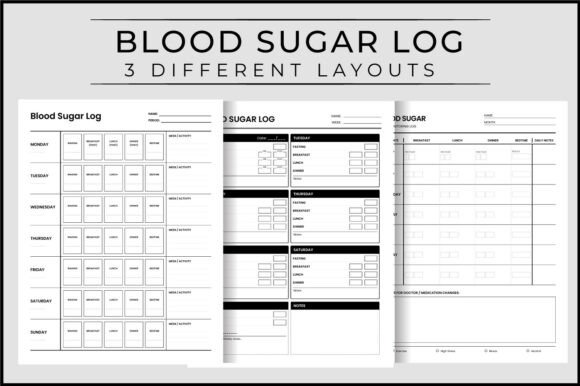
The package we are exploring includes three different layouts in a single set. Each layout offers a distinct visual structure, allowing users to choose the one that best suits their tracking habits. The files come as high-resolution PDFs (300 dpi) and JPG previews, all sized at 8.5″ x 11″ with no bleed. This makes them ready for printing at home or through a professional service, and equally suitable for upload to Amazon KDP as an interior file for a paperback logbook.
Who Benefits from These Layouts?
The audience for these layouts is broader than one might expect. While individuals with diabetes are the most obvious users, the logs also serve:
- Healthcare professionals who provide printed logs to patients for at-home monitoring.
- Caregivers and family members who track readings for elderly or dependent individuals.
- Fitness and wellness coaches who monitor clients' metabolic health as part of a broader program.
- Self-publishers and content creators on Amazon KDP who need a ready-to-upload interior for a health journal.
- Researchers or dietitians conducting dietary studies that require structured daily entries.
Each group has different needs, which is why having multiple layouts in one package is not just convenient—it is essential for matching the tool to the task.
The Three Layouts: Diversity in Design, Unity in Purpose
One of the standout characteristics of this particular interior layout set is the inclusion of three distinct PDF files, each 120 pages long. This is not a case of minor cosmetic differences. Each layout approaches data entry from a different angle.
Layout One: Daily Detail with Time Segments
The first layout focuses on granular daily tracking. Each page accommodates a single day, with space for multiple entries at different times—before breakfast, after lunch, before bed, and so on. This layout is ideal for people who need to track how specific meals, activities, or medications affect their glucose throughout the day. The fields are clearly labeled, and there is room for notes on carbohydrate intake, insulin dosage, and physical activity. For someone newly diagnosed or undergoing medication adjustments, this layout provides the depth needed to spot trends.
Layout Two: Weekly Overview with Compact Design
The second layout takes a broader view. Each page or spread covers an entire week, with columns for each day and rows for time slots. This is a more condensed format, which works well for long-term tracking without the bulk of a daily page. Users who have been managing their condition for a while often prefer this approach because it allows them to see week-over-week patterns at a glance. The compact nature also makes it easier to review progress with a doctor without flipping through dozens of pages.
Layout Three: Hybrid Format with Custom Fields
The third layout strikes a balance between detail and simplicity. It provides structured fields for key data points but also includes blank sections where users can write custom notes. This is especially useful for those who want to track additional variables—such as stress levels, sleep quality, or specific symptoms—alongside blood sugar readings. The hybrid format offers flexibility without sacrificing organization. It is also a favorite among KDP publishers because it appeals to a wide audience who may want to personalize their logging experience.
Key Features of the Interior Layout Set
Beyond the three structural variations, the file package includes several technical and practical features worth noting.
- Three PDF files, each 120 pages – This gives a total of 360 pages of content across the set. The page count is generous enough to cover several months of daily tracking, or a full year if using the weekly layout.
- High resolution at 300 dpi – Ensures sharp, clean prints whether using a home printer or a commercial press. This is critical for KDP interiors, where print quality directly affects customer satisfaction.
- JPG previews included – Each layout is also provided as a JPG file, which makes it easy to preview the design before printing or uploading. This is a small but practical addition for creators who want to check spacing and alignment quickly.
- No bleed and exact trim size – The files are set to 8.5″ x 11″ with no bleed, which is the standard US letter size. For KDP, this simplifies the upload process because the interior does not require extra margin trimming. It also means the design is clean and professional without unnecessary white space.
- Ready to upload for Amazon KDP – The files meet Amazon's specifications for paperback interiors, making them a plug-and-play option for self-publishers who want to create a blood sugar logbook without designing from scratch.
Customization and Flexibility
While the layouts are ready to use as-is, they are also designed with customization in mind. Because they are PDF files, users with PDF editing software can add their own headers, logos, or instructions. KDP publishers can rebrand the interior with their own cover and title. This adaptability makes the set suitable for both personal use and commercial publishing. The 120-page count can also be adjusted—if a publisher wants a shorter book, they can select specific pages from each layout and compile a custom version. However, the full 120-page format works well for a standard 6″ x 9″ trim or the given 8.5″ x 11″ size.
Real-World Applications and Scenarios
To understand the true value of a Blood Sugar Log PDF Interior Layout, it helps to picture concrete situations where it makes a difference.
Scenario one: A newly diagnosed patient. Sarah was diagnosed with type 2 diabetes three weeks ago. Her doctor asked her to keep a log of her blood sugar readings, but she was using a plain notebook. Her entries were scattered, dates were missing, and she could not tell which meals caused spikes. After downloading a layout set, she chose the daily detail format. Within a week, she identified that her morning readings were consistently high after eating oatmeal with brown sugar. She adjusted her breakfast and saw improvement. The layout gave her clarity when she needed it most.
Scenario two: A KDP publisher. Marcus runs a small publishing business on Amazon, specializing in health and wellness journals. He needed a new interior for a blood sugar logbook but did not have time to design one from scratch. He purchased this layout set, customized the cover, and uploaded the PDF directly to KDP. Because the files were print-ready with no bleed and proper resolution, the book passed Amazon's review without issues. He now offers three versions of the same logbook—daily, weekly, and hybrid—using the same base set.
Scenario three: A dietitian working with multiple clients. Emily is a registered dietitian who provides printed tracking sheets to her clients. She prints the weekly overview layout for clients who need long-term trend data, and the daily layout for those who are fine-tuning their insulin timing. The high-resolution PDFs produce clean, professional handouts that reflect well on her practice.
Strengths, Considerations, and Limitations
Every product has its strengths and its trade-offs. Being honest about both helps users make an informed decision.
Strengths
- Versatility – Three layouts in one package cover a wide range of tracking preferences. Users are not locked into a single format.
- Print quality – 300 dpi and no bleed ensure professional results, whether printing at home or through a service.
- KDP readiness – The files eliminate the technical hurdles of self-publishing, saving time and reducing errors.
- Long shelf life – 120 pages per layout means the product is not used up quickly, which is practical for consistent tracking.
Considerations
- Page count flexibility – While 120 pages is generous, some users may prefer a shorter book for portability. Publishers can reduce the pages, but that requires manual editing.
- Customization limitations – The PDFs are pre-designed and do not include editable form fields. Users who want fillable PDFs on a tablet or computer will need additional software.
- No bleed means standard margins – This is generally a positive, but some KDP publishers prefer full-bleed designs for a more polished look. No bleed is simpler but may look less premium in some contexts.
How to Evaluate Suitability for Your Project
Choosing the right Blood Sugar Log PDF Interior Layout comes down to a few key questions.
- Who is the end user? A patient tracking daily health has different needs than a publisher creating a product. If you are the end user, prioritize layout structure that matches your logging habit. If you are a publisher, consider your target audience and whether they prefer daily detail or weekly overview.
- How will it be used? Printed at home requires high contrast and clear labeling. Commercial printing requires proper resolution and bleed settings. For KDP, check that the file meets current Amazon specifications—this set does.
- What is the desired lifespan? 120 pages covers three to four months of daily use or a full year of weekly tracking. If you need a shorter period, you may need to adjust the page count yourself.
- Is customization important? If you want to add personal branding or extra sections, look for layouts that include blank space or use a hybrid format. The third layout in this set is ideal for that.
Final Thoughts on Blood Sugar Log PDF Interior Layout
A well-designed Blood Sugar Log PDF Interior Layout is more than a printable page—it is a tool for health management, a resource for professional practice, and a product opportunity for self-publishers. The set described here, with three distinct layouts, 120 pages each, high resolution, and KDP-ready formatting, offers a practical solution for anyone who values organized, reliable tracking.
Whether you are filling in fields with a pen or uploading files to create a saleable book, the underlying goal is the same: to turn glucose data into a story you can understand and act upon. With the right layout, that story becomes clearer, more consistent, and ultimately more useful.