Bill Payment Tracker KDP Interior: A Practical Tool for Financial Workflow Management
Managing recurring expenses is a fundamental part of running a household, freelancing operation, or small business. Yet many people rely on memory, scattered sticky notes, or a cluttered email inbox to track when bills are due and whether they have been paid. A Bill Payment Tracker KDP Interior offers a structured alternative: a printable, customizable logbook that centralizes every payment obligation into one consistent format. Whether you are a busy professional juggling multiple accounts, a creator managing irregular income, or a publisher assembling financial resources for Amazon KDP, understanding how to integrate this type of tracker into your routine can save time, reduce late fees, and bring clarity to your cash flow.
What a Bill Payment Tracker KDP Interior Actually Does
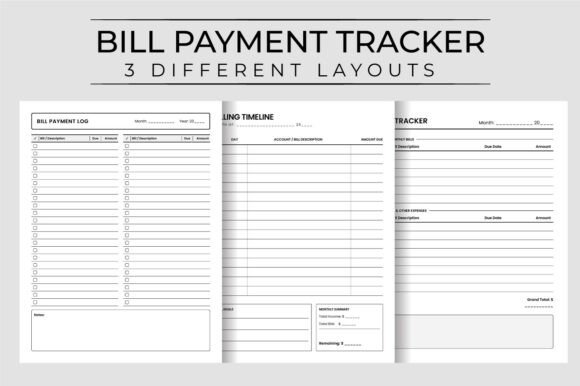
At its core, this interior is a set of pre-formatted pages designed to be uploaded to Amazon KDP and sold as a paperback or digital download. The files included typically offer three different layouts, each with 120 pages, giving you or your customers flexibility to choose a structure that matches personal preference. The page dimensions are 8.5″ x 11″ with no bleed, which means printing is straightforward and trimming is unnecessary. High resolution at 300 dpi ensures text and table lines remain crisp even after multiple print runs. Because the files are ready to upload with no additional formatting required, they fit directly into a KDP listing workflow.
From a practical standpoint, a bill payment tracker converts an abstract list of due dates into a tangible record you can hold, mark up, and review. Each page typically contains columns for the company name, amount due, due date, date paid, confirmation number, and notes. Some layouts include monthly overviews, while others offer a running log by payee. The inclusion of a blank monthly bill notes printable allows users to jot down irregularities, rate changes, or reminders about upcoming adjustments. This is especially useful for freelancers and small business owners whose expenses fluctuate month to month.
Where the Tracker Fits in Your Broader Financial Workflow
A bill payment tracker does not replace your bank’s online bill pay system or your accounting software. Instead, it acts as a low-friction checkpoint between you and those digital systems. Many people find that opening an app or logging into a portal adds just enough friction that they put it off. A printed tracker sitting on your desk or inside a binder is immediately accessible. You can update it during a short break, during a meeting lull, or while you are on a phone call with a utility company disputing a charge.
Consider how this tracker interacts with other tools you already use:
- Calendar apps — You can cross-reference your tracker with your digital calendar to ensure no due date falls on a weekend or holiday when payment might need to be scheduled earlier.
- Spreadsheets — Some users maintain a master spreadsheet for annual budgeting and use the printed tracker as a daily or weekly checkpoint. The tracker becomes the actionable layer on top of the strategic plan.
- Accounting software — For small business owners using tools like QuickBooks or FreshBooks, the tracker serves as a quick visual aid for cash flow forecasting. You can see at a glance which payments have cleared and which are still pending.
- Shared household systems — If multiple people handle bills in a household, a single physical logbook eliminates confusion about who paid what. It becomes the source of truth that everyone can reference without needing access to a shared digital account.
This is not a standalone product. It is a component in a larger system of financial organization. The key is to decide where it fits into your existing process and then use it consistently.
For Individuals and Households
If you are using the tracker personally, start by listing every recurring payment you make over a typical month. Include rent or mortgage, utilities, insurance premiums, subscription services, loan payments, and any irregular but predictable expenses like annual memberships. Assign each to a row in your chosen layout. Then, at the beginning of each month, fill in the due dates and expected amounts for the coming weeks. As you pay each bill, mark it with the date and any confirmation number. This habit alone reduces the mental load of trying to remember whether you paid the internet bill this month.
One practical workflow is to keep the tracker open next to your computer while you process bills weekly. Set a recurring calendar reminder for Friday afternoon. Open each bill in your email or banking portal, pay it, and immediately update the tracker. Over time, this becomes a closed loop that prevents double payments and missed deadlines.
For Freelancers and Creators with Variable Income
Irregular income makes consistent bill tracking even more important. A blank monthly bill notes printable section can be used to project cash flow several weeks ahead. If you know a large payment is due on the 15th and you typically receive client payments around the 10th, you can note that timing directly next to the bill entry. This helps you decide whether to push a payment to a later date or request an early invoice from a client.
You can also use the notes area to track which bills are essential versus discretionary. This prioritization becomes valuable during lean months when you need to decide what to pay first. Having it all in one physical place removes the need to cross-reference multiple spreadsheets or bank tabs.
For KDP Publishers and Content Creators
If you are publishing this interior on Amazon, the key selling point is the three layout options. Buyers want choice because everyone organizes information differently. The three PDF files, each 120 pages long, allow you to offer a complete book without the customer needing to reset page numbers or reformat anything. The no-bleed specification means the book prints cleanly on standard home printers as well as commercial print-on-demand equipment. 300 dpi resolution ensures that lines and text remain sharp, which builds trust with buyers who expect professional quality.
When listing on KDP, emphasize the practical workflow benefits in your product description. Show how the different layouts support different habits: one layout might be ideal for monthly envelope-style budgeting, while another works better for those who want to track one vendor across multiple months. Being specific about use cases helps buyers self-select the right interior and reduces returns or negative reviews.
Preparation and Setup
Spending fifteen minutes at the start of each year setting up the tracker saves hours of confusion later. Fill in known fixed expenses, estimate variable ones based on last year’s records, and flag months where lump-sum payments like insurance or property taxes occur. If you are selling the interior, include a recommendation in the front matter or product description that users spend this setup time. Buyers who feel guided are more likely to use the product consistently and leave positive feedback.
Consistency Over Perfection
The biggest mistake people make with any physical tracker is abandoning it after missing a few entries. Your tracker does not need to be perfect every day. If you skip a week, simply backfill the entries from your bank statement. The act of writing helps reinforce awareness of your financial patterns. Over several months, you will notice trends: which bills tend to increase in certain seasons, which companies are reliable, and where you might be overpaying.
Compatibility with Digital Systems
A printed tracker complements autopay rather than replacing it. Many people set up autopay for fixed bills and use the tracker only for variable amounts or manual payments. That hybrid approach reduces risk while maintaining visibility. You can note autopay confirmation numbers in the tracker so that if a payment fails, you have a written record of the transaction ID to reference when speaking with customer support.
Quality Control for KDP Listings
If you are publishing this interior, check the file preview on Amazon carefully after upload. Ensure that the table borders and text boxes render correctly at different zoom levels. The no-bleed design simplifies this because you do not need to worry about content being cut off at the margins. Test print a few pages at home to confirm that the 300 dpi resolution holds up. A small quality issue in the preview can reduce conversions, so take the time to inspect every layout before publishing.
Real Workflow Example: Monthly Bill Review Cycle
Let’s walk through a concrete workflow using the bill payment tracker. This example assumes you are using a layout that shows one payee per row across multiple months.
- Week one of the month: Pull up your bank account and list all bills that posted in the previous month. Fill in the exact amounts paid and the dates they cleared. Compare this to your tracker entries from last month to catch any discrepancies.
- Week two: Review upcoming due dates for the next four weeks. Fill in the estimated or known amounts for each. If a bill has not arrived yet, leave the amount blank and check again next week.
- Week three: Pay any bills that are due in the coming week. Mark the payment date and confirmation number immediately. If you are using autopay, verify that the payment has initiated and note the confirmation from your bank.
- Week four: Close out the month by reviewing any unpaid items. Follow up on any bills that seem missing or overdue. File the completed page or move to the next month’s section.
This cycle takes about ten minutes per week. Over a year, that is roughly eight hours of time invested, but it eliminates the stress of missed payments, late fees, and the mental clutter of wondering if you forgot something. For a freelancer or small business owner, those eight hours are a fraction of the time spent resolving billing errors or disputing late fees.
Long-Term Use and Adaptability
The 120-page structure means the tracker can cover an entire year with space left over for notes, annual summaries, or budget planning pages. If you are publishing for KDP, you can easily scale the page count up or down depending on the audience. A 120-page book works well for a full year of weekly or monthly tracking. A shorter version with 60 pages might appeal to someone who wants to try the system before committing to a full year. Offering both options in separate listings can capture different buyer intents.
Because the interior includes three layouts, the same file set can serve different stages of financial maturity. A beginner might prefer the simplest layout with just date, payee, and amount. A more experienced user might want columns for account numbers, confirmation codes, and notes. The variety ensures that the product remains useful as the buyer’s habits evolve. They do not need to purchase a new interior next year; they can simply switch to a different layout within the same book.
Final Observations on Integration
A bill payment tracker is not a magic solution for financial health, but it is a reliable anchor in a world of digital notifications and autopay settings. It forces a moment of deliberate attention to your obligations, which is something that automated systems do not provide. For the target audience — professionals, creators, entrepreneurs, publishers, and productivity-minded individuals — that moment of attention is exactly what prevents small oversights from becoming larger problems.
Whether you are buying this interior for personal use or publishing it on Amazon KDP, the value lies in its simplicity and adaptability. Three layouts give you options. 120 pages give you longevity. Printable PDFs give you immediate utility. When integrated into a weekly or monthly review cycle, this tracker becomes a practical tool that reduces friction, increases accountability, and supports sound financial habits over the long term.