Teacher Management Binder Canva KDP: Build a Classroom Organization System That Works for You
Every teacher knows the feeling. You have lesson plans to finalize, parent-teacher conferences to prepare for, student records to update, and a dozen other tasks competing for your attention. The paper piles up. The digital folders multiply. And somehow, the one piece of information you need most at any given moment seems to be the one you cannot find. Classroom organization is not just about tidiness. It is about reclaiming your time, reducing stress, and creating a system that supports you instead of adding to your workload. That is where the Teacher Management Binder Canva KDP comes into the picture—not as a rigid, one-size-fits-all solution, but as a flexible framework that you can shape around your own teaching style and daily realities.
What Is the Teacher Management Binder Canva KDP?
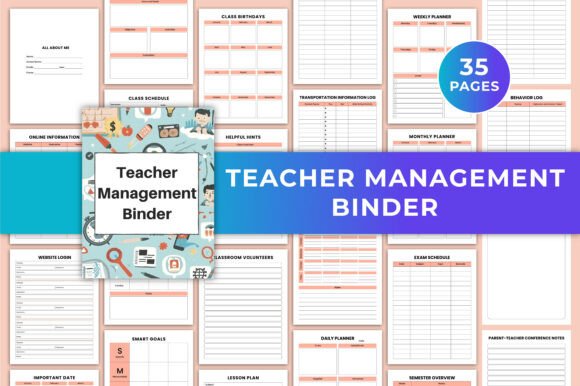
The Teacher Management Binder Canva KDP is a fully editable Canva template designed specifically for educators who want a centralized, organized system for managing their classroom responsibilities. It includes 35 printable pages covering everything from lesson planning and class schedules to student medical information, behavior logs, and parent-teacher conference notes. Because it is built as a Canva template, you are not stuck with a preprinted layout or a fixed design. You can change the fonts, adjust the colors, rearrange the layout, and personalize every page to fit exactly what you need. Whether you prefer a minimalist aesthetic, a bold and colorful look, or something in between, the template adapts to you.
The product comes as a printable PDF file in US Letter size (8.5 × 11 inches), along with high-quality JPG and PNG files. There is no bleed, so printing at home or at a copy center is straightforward. But the real value lies in the editability. You are not just buying a binder. You are buying the ability to design a management system that reflects how you actually work.
Why Most Teacher Organization Systems Fall Short
Walk into any teacher supply store or browse online, and you will find countless planners, binders, and organizers. Many of them look beautiful on the shelf. But they often come with a fundamental problem: they are designed for a generic teacher in a generic classroom. Real teaching is not generic. You might teach multiple subjects, run a specialized program, or work with students who have unique needs. Your school calendar might follow a block schedule, a rotating schedule, or something entirely unconventional. A pre-made planner that forces you into a specific structure can end up being more frustrating than helpful.
The Teacher Management Binder Canva KDP addresses this issue directly by putting you in control. Instead of trying to fit your workflow into someone else's template, you start with a solid foundation and then make it your own. That small shift in ownership makes a significant difference in whether you actually use the system consistently.
Addressing the Real Challenges Teachers Face
Teaching is one of the most demanding professions when it comes to information management. You are responsible for tracking academic progress, attendance, medical needs, behavioral patterns, communication with families, and professional development goals—often all in the same day. The cognitive load is enormous. A well-designed binder system helps offload that mental burden so you can focus on what matters most: your students.
Here are some of the key challenges that the Teacher Management Binder Canva KDP helps address:
- Scattered information. When student data, lesson plans, and notes are spread across multiple notebooks, sticky notes, digital apps, and email threads, finding what you need becomes a time drain. This binder centralizes everything into one organized location.
- Inconsistent planning. Without a structured format, lesson planning can become haphazard. The weekly and monthly planner pages, along with the semester overview and exam schedule, give you a consistent framework to work from.
- Missed important dates. Between staff meetings, field trips, assessment deadlines, and student birthdays, it is easy to let something slip. The important dates and class birthdays pages help you stay ahead.
- Difficulty tracking communication. Parent-teacher conferences, phone calls, and emails can blur together over time. The communications log and parent-teacher conference notes pages ensure you have a clear record of every interaction.
- Lack of personalization. Many planners force you into a specific system. With this editable template, you can prioritize the sections that matter most to you and remove or modify the ones that do not.
How Different Teachers Can Use This Binder
One of the strengths of the Teacher Management Binder Canva KDP is that it works across a wide range of teaching contexts. A first-year elementary teacher will use it differently than a veteran high school science teacher, and both can get real value from it.
For the early-career teacher, the binder can serve as a professional anchor. The SMART goals page helps you set and track your professional development objectives. The helpful hints section gives you a place to record advice from mentors and colleagues. The semester plans and lesson planner pages provide structure during a time when everything can feel overwhelming. Having everything in one place builds confidence and reduces the chaos that often accompanies the first few years in the classroom.
For the experienced teacher, the binder becomes a tool for refinement and efficiency. You already know what works for you. Now you can take the template and strip it down to exactly what you need. Maybe you only use the behavior log, the communications log, and the weekly lesson plan pages. Maybe you add your own sections by duplicating and modifying existing pages. The flexibility means you are not paying for pages you will never use.
For specialists such as reading specialists, special education teachers, or interventionists, the binder can be customized to track specific data points that matter in your role. The reading list, medical information, and transportation log pages are especially useful when you work with students across multiple classrooms or grade levels.
Practical Applications and Real Outcomes
When you build a management system that truly fits your workflow, the benefits go beyond just feeling organized. You start to notice real changes in your daily experience as a teacher.
Time savings. Instead of searching for information, you open your binder and find it immediately. Those saved minutes add up over the course of a week. Many teachers report that they reclaim several hours per month simply by having a centralized system.
Improved communication with families. The communications log and parent-teacher conference notes pages make it easy to reference previous conversations. When you can say to a parent, "Last time we spoke on October 12, we discussed X, and here is the progress since then," it builds trust and shows that you are attentive and organized.
Better lesson continuity. The weekly lesson plan and lesson planner pages help you maintain coherence across your instruction. When you can see what you taught last week and what is coming up next week, it is easier to make intentional connections for your students.
Reduced anxiety. A lot of teacher stress comes from the fear of forgetting something important. When you have a system you trust, that background anxiety decreases. You can walk into a parent meeting, an IEP conference, or an administrative review knowing that your documentation is complete and accessible.
Making the Most of the Editable Canva Template
The fact that this is a fully editable Canva template is not just a nice feature. It is the core of what makes this product useful. Here are some practical ways to take advantage of that editability:
- Match your school colors. If your school has a specific color scheme or uses certain fonts for official documents, you can align your binder with those standards. This makes it feel more professional and cohesive.
- Add your own sections. The template comes with 35 pages, but you can duplicate pages and rename them to create sections that are unique to your role. For example, you might add a page for pull-out group schedules or a page for tracking professional development hours.
- Adjust the layout for your printing preferences. Some teachers prefer to print double-sided to save paper. Others like to print single-sided and use page protectors. The editable format lets you adjust margins, spacing, and page breaks to match your preferred setup.
- Update throughout the year. As your needs change, you can go back into Canva and modify the template. If you realize halfway through the year that you need a different type of weekly planner layout, you can change it without starting from scratch.
- Create multiple versions. You might use one version of the binder for your general classroom management and a modified version for a specific committee or leadership role you hold.
Considerations Before You Get Started
While the Teacher Management Binder Canva KDP is designed to be user-friendly, there are a few things to keep in mind to ensure you get the most out of it.
First, take some time to think about your existing workflow before you start editing. What pages will you actually use? What information do you need to access most frequently? It can be tempting to customize everything at once, but a more effective approach is to start with the pages that address your biggest pain points and build from there.
Second, consider how you will use the binder in your daily routine. Will you keep it on your desk and refer to it throughout the day? Will you take it to meetings and professional development sessions? Will you keep a digital copy on your device for quick reference? Thinking about the physical or digital workflow will help you decide how to organize and print the pages.
Third, remember that consistency matters more than perfection. A binder that you use imperfectly every day is far more valuable than a beautifully designed binder that sits on your shelf. Do not feel pressured to have every page filled out perfectly before you start using it. Let the system grow with you as the school year progresses.
Building a System That Lasts
The best teacher management system is one that you will actually use. The Teacher Management Binder Canva KDP gives you the tools to build that system, but the lasting value comes from how you integrate it into your teaching practice. Set aside a few minutes at the end of each day or each week to update your pages. Use the behavior log consistently so that patterns become visible over time. Keep your communications log current so that you have accurate records when you need them. These small habits compound into a level of organization that makes your professional life smoother and more enjoyable.
Teaching is a profession that demands a lot of you. A good organization system cannot eliminate the challenges, but it can remove the friction caused by disorganization. When your information is easy to find, your plans are easy to follow, and your records are easy to reference, you free up mental energy for the parts of teaching that truly matter—building relationships with students, designing engaging lessons, and growing as an educator. The Teacher Management Binder Canva KDP is a practical tool to help you get there, on your own terms.